priPrinter is a printer driver that allows you to manipulate printer output before it is printed. priPrinter is installed and selected in the same way as other printer drivers. After printing it automatically displays print preview where you can preview your printings, change layout, reposition pages, crop them and many more.
Showing posts with label Desktop Tools. Show all posts
Chrome OS USB Edition
Chrome OS is a brand new free operating system built around the revolutionary Google Chrome browser.
The project aim is to provide a lightweight Linux distribution for the best web browsing experience.
Labels:
Desktop Tools,
Linux,
Operating Systems,
Softwares,
System Tools
CursorFX Plus
Stardock CursorFX is a program that lets you use and create incredibly cool looking Windows mouse cursors.
It does this by taking advantage of the new visual effects features of Windows XP and Windows Vista.
Talisman Desktop
"Talisman Desktop" (Talisman) is a desktop alternative and shell-replacement for Windows 9x/ME and NT/2000/XP/2003/Vista/7, capable of transforming your desktop into an interface organized as you like. The program's basic purpose: Launch other applications in a new interface, instead of the standard Windows desktop. But the opportunities presented by "Talisman" are much broader.
VIBlend Input Controls and Editors
CursorFX 2.0 plus + Themes
Capture .NET
Capture is a multi-functional desktop utility that includes many helpful tools: Capture screen; Capture color; Screen ruler; FontViewer; Reveal password; Privacy eraser; SysTweak; Converter; BackupExpert; Magnifier; Alarm Clock; PostIt; Screen Calender; and much more. A standalone tool that does not require installation.
Download Link: Capture .NET
NumCapsScroll Indicator
• On-screen real-time indicator showing the status of the Num, Caps and Scroll Lock buttons on the keyboard.
• NumCapsScroll Indicator monitors the keyboard status of the Num, Caps and Scroll Lock buttons and indicates it with the following ways:
1. In the System Tray with its icon.
2. With a tool-tip when you mouse-over its
System Tray's icon.
3. With a small On-screen Keyboard-like panel.
4. With a discreet sound ( optional as
a selection, but it gives you also the
ability to hear a special sound when the
Caps Lock key is active ).
1. In the System Tray with its icon.
2. With a tool-tip when you mouse-over its
System Tray's icon.
3. With a small On-screen Keyboard-like panel.
4. With a discreet sound ( optional as
a selection, but it gives you also the
ability to hear a special sound when the
Caps Lock key is active ).
• All the NumCapsScroll Indicator's controls are available from its System Tray right-click context menu.
Download Link: NumCapsScroll Indicator
SE-TrayMenu
Use SE-TrayMenu to gain quick access to most frequently used applications and system commands via a customizable popup menu.
Main features:
- Add any elements to your Windows system tray: programs, documents, folders, internet links and more
- Specify global hotkeys to access everything you want with one click
- Quick add of applications and links using drag and drop
- Quick add of frequently used applications and installed programs
- Completely customizable view with lots of pre-defined layouts and color schemes
- Clear multilingual interface: English, Deutsch, Russian, Hungarian, Svenska and Japanese
- Portable version is available.
Download Link: SE-TrayMenu
8start
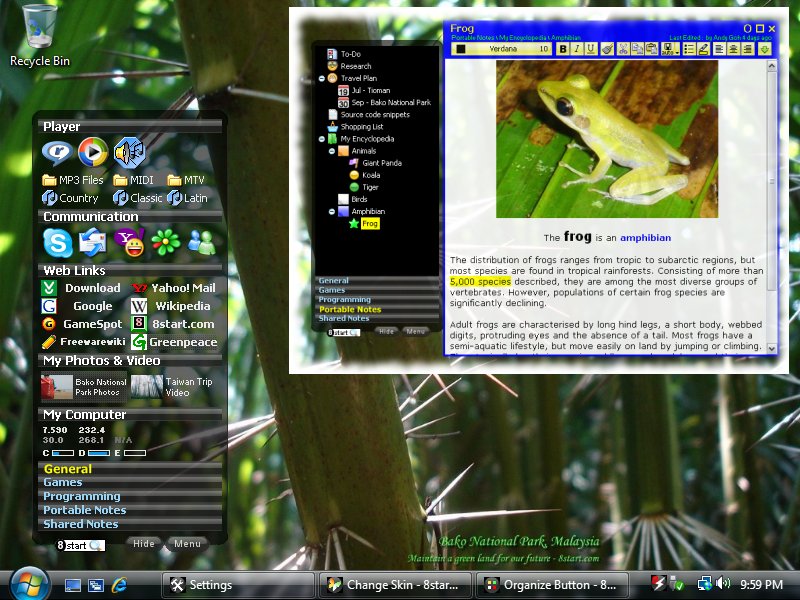
8start Launcher is a free, art designed, fast, flexible and intuitive application launcher, you can organize shortcuts into groups and categories, accessed from the system tray. It keeps your desktop clean, is more convenient than the Windows Start menu, and more efficient than the Quick launch bar when you have a lot of shortcuts. 8start Launcher is skinnable and can be portable, defining a relative path is supported so that it can be run from a flash drive or it can be installed on a hard disk.
Download Link: 8start
Desktop Activity Recorder
Desktop Activity Recorder records PC screen activity to AVI or Flash files. This advanced screen capture tool can record anything on the computer screen, including the entire desktop, windows, menus, cursors, and even video with sound.
Desktop Activity Recorder assists to demonstrate features of a website or program, for training, demo, or any other task that requires showing screen activity.
Key Features:
Record a single window or any region of the screen.
Record and replay movies of your screen.
Export movie to AVI or SWF file.
Record sound through microphone.
Screen Recorder is quick, simple and easy to use.
Enhance with sound, text and images.
Download Link: Desktop Activity Recorder
360 Desktop
360desktop is free software that extens Windows as a 360� workspace, plus an online environment for creating interative 360� wallpaper, with a gallery and a widget platform, for sharing your favorite 360's with everybody.
360desktop is for everyone!
Take it for a Spin.Your desktop goes full circle more space, more fun. Anyone can create. Create your own interactive 360 even make money Customize & Organize Personalize your workspace for work & play Share & Analyze Share your creations and fav 360 everywhere
Download Link: 360 Desktop
Aquarium Desktop 2009
Aquarium Desktop 2009 isn’t a screen saver. It actually puts virtual fish and plants onto your desktop to swim around while you work.
* Smoothly animated fish swim across your desktop in a life-like manner.
* Plants gently move to the current of the virtual water.
* Add plants, anchors, debris, and even a treasure chest to your desktop.
* Options to configure type and quantity of fish, shadows, sounds, and more!
* CPU-smart! Will not use CPU if fish are covered (it won’t slow down your system).
* It’s just incredibly cool
* Smoothly animated fish swim across your desktop in a life-like manner.
* Plants gently move to the current of the virtual water.
* Add plants, anchors, debris, and even a treasure chest to your desktop.
* Options to configure type and quantity of fish, shadows, sounds, and more!
* CPU-smart! Will not use CPU if fish are covered (it won’t slow down your system).
* It’s just incredibly cool
Download Link: Aquarium Desktop 2009
CubeDesktop 1.1.3
CubeDesktop creates six virtual and independent desktops, increasing the space you have to work and play. Use our stunning 3D technology to quickly show, switch and move windows between desktops. You can improve your Windows Vista experience. CubeDesktop is the best Vista addon so far, adding to your desktop incredible 2D and 3D effects.
-- Windows and desktops update in realtime, like Windows Vista new thumbnails, but in true 3D.
-- Impress everybody that looks at your computer and change the way you work with it!
Fortunately, CubeDesktop, being the most robust multiple desktop software, solves the desktop clutter problem once and for all. Each virtual desktop is a distinct working environment. The taskbar shows only the applications opened on the current desktop, greatly reducing the clutter.
-- CubeDesktop helps users to maximize productivity though the advanced application and desktop management, providing increased efficiency even on a single monitor by enabling multiple desktops. It enables users to quickly access any virtual desktop or window, fast transfer of windows between virtual desktops as well as the total control over applications, thus creating the ideal working enviroment.
Switch between tasks using our Window Exposer technology. With a single keypress or mouse move, Window Exposer instantly tiles all of your open windows, scales them down and neatly arranges them, so you can see what's in every single one. Bring to your Windows Vista desktop the most impressive Mac OS X Exposé-like experience.
-- CubeDesktop is highly configurable. Change keyboard settings, mouse movements, visual effects, colors and more, much more. But don't be afraid. Using CubeDesktop Control Panel is as easy as changing the wallpaper of your desktop or copying a file from one folder to another.”
CubeDesktop. Main features
>> Virtual desktops
CubeDesktop creates six virtual and independent desktops, increasing the space you have to work and play.
Being the most robust multiple desktop software, CubeDesktop solves the desktop clutter problem once and for all. Each virtual desktop is a distinct working environment. The taskbar shows only the applications opened on the current desktop, greatly reducing the clutter.
>> 3D effects
Use the 3D cube to preview, switch or move windows to another desktop. Or just for fun.
Improve your Windows Vista experience. CubeDesktop is the best Vista addon so far, adding to your desktop incredible 2D and 3D effects.
Windows and desktops update in realtime, like Windows Vista new thumbnails, but in true 3D.
Impress everybody that looks at your computer and change the way you work with it!
>> Moving windows between desktops
CubeDesktop offers various ways to move applications amongst desktops.
Drag a window near the edge of the screen to show the 3D cube and drop it on the desktop of your choice.
"SendTo" menu items integrated into all applications' system menus allow you to send applications to the desired desktop.
You can also use hotkeys to move the selected window to another desktop.
>> Live preview
CubeDesktop is not like the classic utilities for Windows. Everything is live. When you switch between desktops using the 3D interface or the desktop explorer, you see a live preview of what's happening. All windows update in realtime, allowing you to see what you're really looking for.
>> Window organization
Open the full graphical desktop preview to see all desktops at the same time. Every window is just one click away. Move them between desktops in a hurry.
Autosend rules allow you to move windows to one desktop automatically when they open. When this happens, a notification bubble hint will inform you, no need to look for it!
Named desktops will make it easier to organize your windows. Imagine having one "internet" desktop, one "work" desktop, ...
>> Desktop customization
Every single desktop may have its own wallpapers, icons and name. Change your Windows wallpaper as usual and arrange your icons using your favourite layout on every single desktop, CubeDesktop just remembers everything when you switch between desktops.
CubeDesktop also includes an integrated icon manager, allowing you to quick and easily which icons are shown on every desktop.
>> Switch between tasks faster than ever before
Switch between tasks using Window Exposer. With a single keypress or mouse move, Window Exposer instantly tiles all of your open windows, scales them down and neatly arranges them, so you can see what's in every single one. This feature brings to your Windows Vista desktop the most impressive Mac OS X Exposé-like experience.
>> Hot corners
Just move the mouse pointer over the screen edges and watch how the action you configured gets executed.
>> Advanced visualization effects
CubeDesktop uses advanced 2D and 3D techniques like animation with physical dynamics, transparency, reflection, lighting and antialiasing.
All effects are fully configurable. 3D visualization also allows you to set personalized backgrounds and 360º panoramic skyboxes.
>> More great features
CubeDesktop users receive free application upgrades until next major version and online support.
-- Windows and desktops update in realtime, like Windows Vista new thumbnails, but in true 3D.
-- Impress everybody that looks at your computer and change the way you work with it!
Fortunately, CubeDesktop, being the most robust multiple desktop software, solves the desktop clutter problem once and for all. Each virtual desktop is a distinct working environment. The taskbar shows only the applications opened on the current desktop, greatly reducing the clutter.
-- CubeDesktop helps users to maximize productivity though the advanced application and desktop management, providing increased efficiency even on a single monitor by enabling multiple desktops. It enables users to quickly access any virtual desktop or window, fast transfer of windows between virtual desktops as well as the total control over applications, thus creating the ideal working enviroment.
Switch between tasks using our Window Exposer technology. With a single keypress or mouse move, Window Exposer instantly tiles all of your open windows, scales them down and neatly arranges them, so you can see what's in every single one. Bring to your Windows Vista desktop the most impressive Mac OS X Exposé-like experience.
-- CubeDesktop is highly configurable. Change keyboard settings, mouse movements, visual effects, colors and more, much more. But don't be afraid. Using CubeDesktop Control Panel is as easy as changing the wallpaper of your desktop or copying a file from one folder to another.”
CubeDesktop. Main features
>> Virtual desktops
CubeDesktop creates six virtual and independent desktops, increasing the space you have to work and play.
Being the most robust multiple desktop software, CubeDesktop solves the desktop clutter problem once and for all. Each virtual desktop is a distinct working environment. The taskbar shows only the applications opened on the current desktop, greatly reducing the clutter.
>> 3D effects
Use the 3D cube to preview, switch or move windows to another desktop. Or just for fun.
Improve your Windows Vista experience. CubeDesktop is the best Vista addon so far, adding to your desktop incredible 2D and 3D effects.
Windows and desktops update in realtime, like Windows Vista new thumbnails, but in true 3D.
Impress everybody that looks at your computer and change the way you work with it!
>> Moving windows between desktops
CubeDesktop offers various ways to move applications amongst desktops.
Drag a window near the edge of the screen to show the 3D cube and drop it on the desktop of your choice.
"SendTo" menu items integrated into all applications' system menus allow you to send applications to the desired desktop.
You can also use hotkeys to move the selected window to another desktop.
>> Live preview
CubeDesktop is not like the classic utilities for Windows. Everything is live. When you switch between desktops using the 3D interface or the desktop explorer, you see a live preview of what's happening. All windows update in realtime, allowing you to see what you're really looking for.
>> Window organization
Open the full graphical desktop preview to see all desktops at the same time. Every window is just one click away. Move them between desktops in a hurry.
Autosend rules allow you to move windows to one desktop automatically when they open. When this happens, a notification bubble hint will inform you, no need to look for it!
Named desktops will make it easier to organize your windows. Imagine having one "internet" desktop, one "work" desktop, ...
>> Desktop customization
Every single desktop may have its own wallpapers, icons and name. Change your Windows wallpaper as usual and arrange your icons using your favourite layout on every single desktop, CubeDesktop just remembers everything when you switch between desktops.
CubeDesktop also includes an integrated icon manager, allowing you to quick and easily which icons are shown on every desktop.
>> Switch between tasks faster than ever before
Switch between tasks using Window Exposer. With a single keypress or mouse move, Window Exposer instantly tiles all of your open windows, scales them down and neatly arranges them, so you can see what's in every single one. This feature brings to your Windows Vista desktop the most impressive Mac OS X Exposé-like experience.
>> Hot corners
Just move the mouse pointer over the screen edges and watch how the action you configured gets executed.
>> Advanced visualization effects
CubeDesktop uses advanced 2D and 3D techniques like animation with physical dynamics, transparency, reflection, lighting and antialiasing.
All effects are fully configurable. 3D visualization also allows you to set personalized backgrounds and 360º panoramic skyboxes.
>> More great features
CubeDesktop users receive free application upgrades until next major version and online support.
Download Link: CubeDesktop 1.1.3
Subscribe to:
Posts (Atom)